


Products
Search
Manufacturers
Services
Calibrations (Accredited laboratory) Maintenance - Repairs Department of Cleanroom Validation (Lloyd's Register Certified)) IQ/OQ/PQ Temperature/ Humidity Mapping Occupational Health & Safety Measurements Validation Studies Vibration and Noise studies Laboratory OrganizationClarity Lite Chromatography Software


Clarity Lite Chromatography Software
Clarity Lite provides data acquisition from one chromatograph with an analogue output. Simplified and inexpensive solution for a non-regulated environment.
Manufacturer : DataApex

CLARITY LITE CHROMATOGRAPHY SOFTWARE(scroll down and click on the link for a Clarity lite demo version) |
|
Clarity Lite provides data acquisition from one chromatograph with an analogue output. Simplified and inexpensive solution for a non-regulated environment.
Up to four signals from a single chromatography system (sharing one common timeline) can be acquired. Only one compatible A/D board/converter could be used. Its use is also limited to a non-regulated environment because Clarity Lite does not include functions for 21 CFR Part 11 compliancy. Clarity Lite is an ideal replacement for old HPLC/GC integrators and can easily be upgraded to standard Clarity. |
|
|
||||||||||||||||||||||||||||
CLARITY LITE - MAIN FEATURES
|
CLARITY LITE - SCREENSHOTS
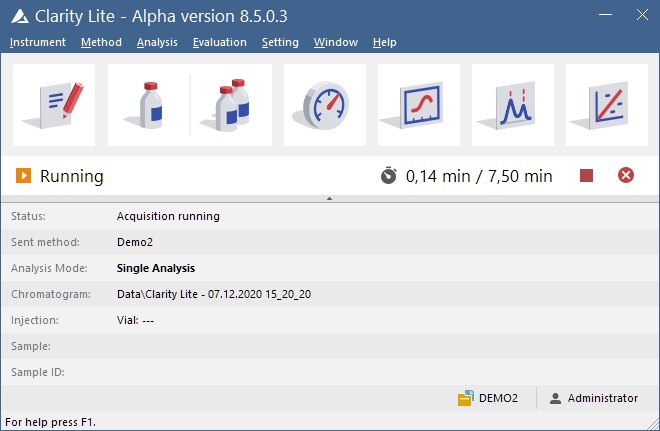
Clarity Lite window

The Clarity Lite main window is the control center of the entire process of data acquisition and evaluation.
The Information Table displays the processed sample: Name, applied template method, acquisition mode, etc.
The Status Line indicates the current state of the analysis: elapsed time and state.
The Analysis-processing Diagram provides icons for fast access to each process of the whole procedure.
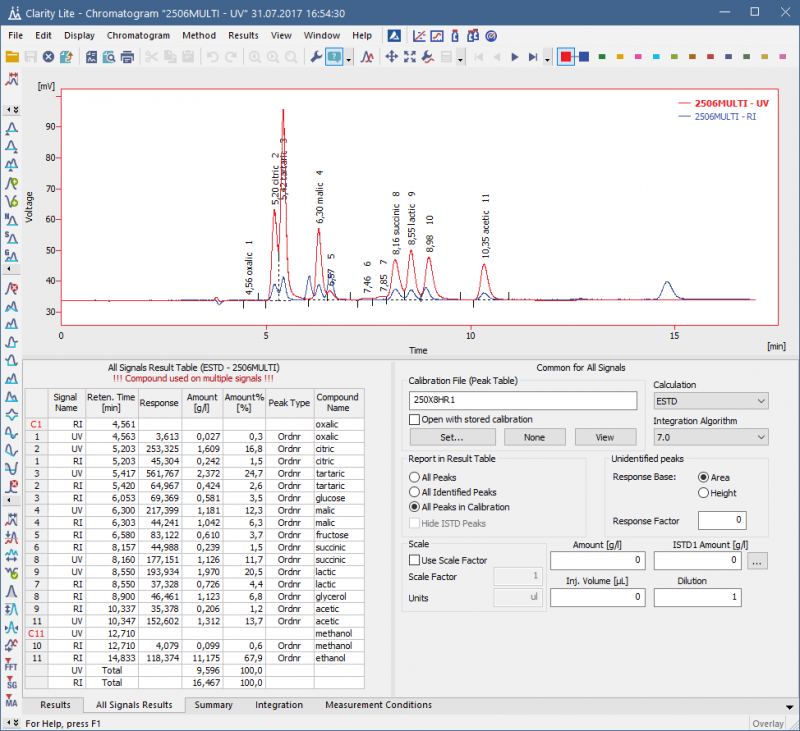
Chromatogram window

The Chromatogram window displays the chromatogram and its results. Users can easily edit acquired chromatograms visually, in the graph, or through the Integration table.
The Result Tables can be easily customized to display the data you want see exactly in the way you want to see them.
The Summary tab displays data from overlaid chromatograms in one table for easy comparison.
Calibration window

The Calibration window has two main screens, a global calibration table and dedicated tabs for each compound (on the screenshot)
The compound tabs contain a table with concentration levels matching the response with Amount and a calibration curve.
Any point can be temporarily suspended in the graph it is then marked with a circle instead of a cross.
Event Table

The Event table allows to control digital outputs, analysis, sequence or run a specified command based on events such change of state of digital input, signal level, analysis time, etc. The Colibrick A/D converter supplied by DataApex provide digital outputs that can be used for Start synchronization with other devices.
CLARITY LITE DEMO VERSION
|
Clarity Lite DEMO version allows you to get your hands on the Clarity software. - Preview all Clarity Lite functions - Experience the look and feel of working with the software - Data acquisition simulated from a data file - Demo data for data processing - Allows to compare functionalities with the full version of Clarity |